Table of Contents
1. Introduction
2. Setting Up Your Online School through Teachable
3. Connecting Your Domain Name with Namecheap
4. Linking Email with Help Scout
5. Namecheap Settings
- Auto-Renewal
- WhoisGuard
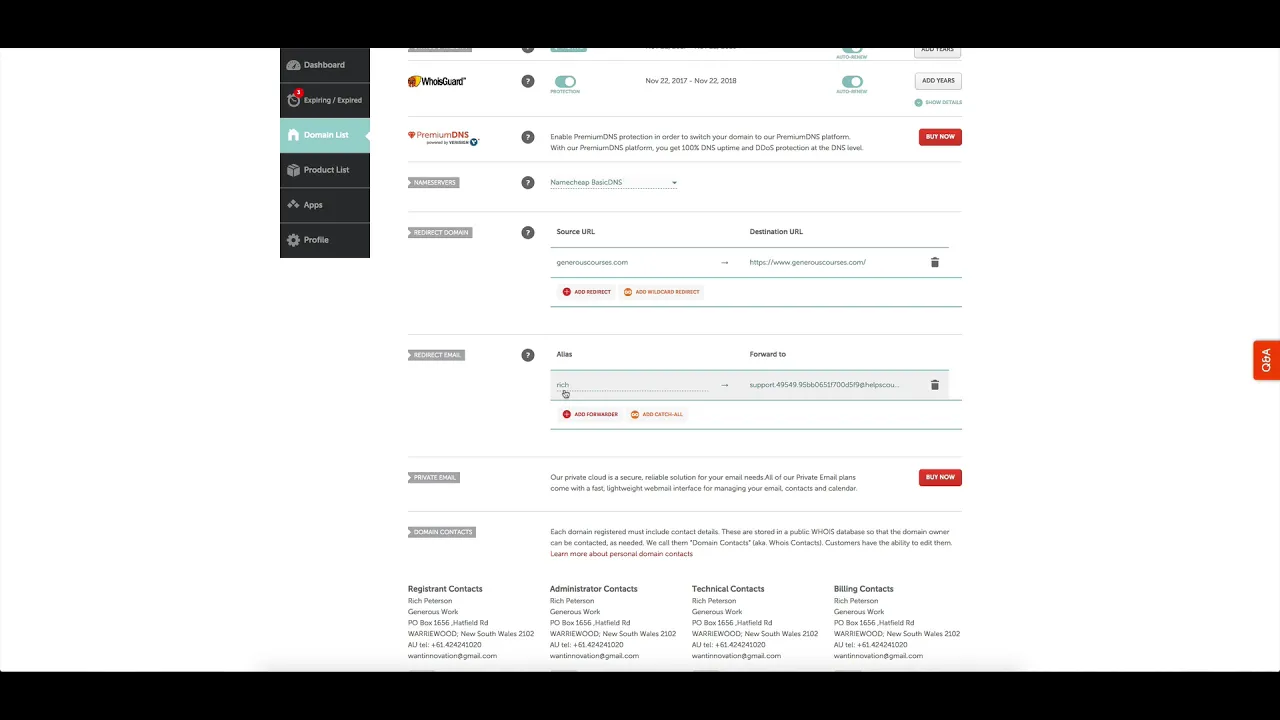
- Name Servers
- Email Redirect
- Parking Page
6. Advanced DNS Settings
7. Teachable Setup
- Adding New Domains
- Creating CNAME Records
- Verifying Email with Help Scout
8. Finalizing the Setup
- Overnight Updates
- Verifying Domains in Teachable
- Setting Primary Domain
9. Conclusion
Introduction
In this article, we will guide you through the process of setting up your online school using Teachable and connecting your domain name with Namecheap. Additionally, we will show you how to link your email with Help Scout, a powerful email software system. By following these steps, you will be able to seamlessly direct traffic to your Teachable school and manage your email efficiently.
Setting Up Your Online School through Teachable
Before we dive into the technical details, let's understand the process of setting up your online school through Teachable. Teachable provides a user-friendly platform for creating and managing online courses. By utilizing their hosting services, you can focus on delivering high-quality content to your students without worrying about technical complexities.
Connecting Your Domain Name with Namecheap
To establish a professional online presence, it's essential to connect your domain name with your Teachable school. Namecheap, a popular domain registrar, offers a straightforward process for managing your domain settings. By following the steps outlined in this section, you will ensure that your domain points to your Teachable school seamlessly.
Linking Email with Help Scout
Managing email communication effectively is crucial for any online business. Help Scout is a powerful email software system that automates various email processes and provides multiple inboxes for efficient organization. By linking your email with Help Scout, you can streamline your email management and enhance customer support.
Namecheap Settings
Before connecting your domain with Teachable, there are a few important settings to configure in Namecheap. We will guide you through enabling auto-renewal, setting up WhoisGuard for spam protection, configuring name servers, redirecting email, and disabling the parking page. These settings will ensure a smooth transition and optimal functionality.
Advanced DNS Settings
In this section, we will explore the advanced DNS settings in Namecheap. If you have experience with setting up WordPress or managing DNS settings, you can leverage these options to customize your domain further. We will cover topics such as web hosting DNS, email settings, and advanced DNS configurations within cPanel.
Teachable Setup
Now that we have configured the necessary settings in Namecheap, it's time to set up your Teachable school. We will guide you through the process of adding new domains, creating CNAME records, and verifying email addresses with Help Scout. These steps are crucial for establishing a seamless connection between your domain and Teachable.
Finalizing the Setup
After completing the initial setup, there are a few final steps to ensure everything is working correctly. We will discuss the overnight updates required for DNS records to propagate, verifying domains within Teachable, and setting your primary domain. These steps will finalize the setup and ensure a smooth experience for your students.
Conclusion
Congratulations! You have successfully set up your online school through Teachable, connected your domain name with Namecheap, and linked your email with Help Scout. By following the steps outlined in this article, you have established a professional online presence and streamlined your email management. Now, you can focus on delivering exceptional educational content to your students.
---
**Note:** If you need assistance with any aspect of this setup or have further questions, feel free to reach out to our AI Chatbot at [AI Chatbot](https://www.voc.ai/product/ai-chatbot). Our chatbot can help automate customer service tasks, reducing your workload significantly.
---
Highlights
- Set up your online school through Teachable effortlessly.
- Connect your domain name with Namecheap for a professional online presence.
- Streamline email management using Help Scout's powerful features.
- Configure essential settings in Namecheap for optimal functionality.
- Customize advanced DNS settings to suit your specific requirements.
- Add new domains, create CNAME records, and verify email addresses in Teachable.
- Finalize the setup by ensuring overnight updates and verifying domains.
- Enjoy a seamless online teaching experience and focus on delivering exceptional content to your students.
---
FAQ
**Q: How long does it take for DNS records to update?**
A: DNS record updates typically take around 24-48 hours to propagate fully. During this time, it's normal to experience intermittent connectivity issues.
**Q: Can I have multiple domains pointing to my Teachable school?**
A: Yes, Teachable allows you to add multiple domains and redirect them to your primary domain. This feature is useful if you have different domain names for specific courses or marketing purposes.
**Q: Can I use a different email software system instead of Help Scout?**
A: Absolutely! While we recommend Help Scout for its powerful features, you can integrate other email software systems with Teachable. Ensure you follow the respective software's documentation for the setup process.
**Q: How can I sell my domain name if I no longer need it?**
A: Namecheap provides a sharing and transfer feature that allows you to sell your domain name to interested buyers. You can initiate the transfer process through your Namecheap account.
**Q: Can I switch to a different web hosting provider in the future?**
A: Yes, if you decide to switch to a different web hosting provider, you can update your name servers in Namecheap accordingly. This will redirect your domain to the new hosting provider's servers.
---
**Resources:**
- [Teachable](https://teachable.com)
- [Namecheap](https://www.namecheap.com)
- [Help Scout](https://www.helpscout.com)
---
Remember, if you have any further questions or need assistance, our AI Chatbot at [AI Chatbot](https://www.voc.ai/product/ai-chatbot) is here to help!


