Table of Contents
1. Introduction
2. Creating a Drop-Down Menu
3. Defining Discounted Rates
4. Using the VLOOKUP Function
5. Applying Discounted Prices
6. Customizing Price Lists for Different Customers
7. Modifying Discount Rates
8. Testing and Adjusting Prices
9. Conclusion
Introduction
In this article, we will explore how to create different price lists for different customers using the same table. Often, businesses need to offer discounted prices to specific customer tiers, such as wholesale customers, distributors, and loyal customers. By implementing a few techniques, we can efficiently manage these varying price structures. Let's dive in and learn how to accomplish this!
1. Creating a Drop-Down Menu
To begin, we need to create a drop-down menu that allows us to select the customer tier. This menu will serve as the basis for applying different discounted prices. We can achieve this by following a few simple steps:
1. Go to the "Data" tab.
2. Select "Data Validation."
3. Choose "List" as the validation criteria.
4. Specify the range of customer tiers as the list source.
5. Confirm the settings.
Once completed, you will have a drop-down menu that displays the available customer tiers. This menu will be crucial for selecting the appropriate price list.
2. Defining Discounted Rates
Next, we need to define the discounted rates for each customer tier. These rates determine the percentage by which the retail price will be reduced. Let's define the rates for our example:
- Wholesale customers: 20% discount
- Distributors: 10% discount
- Loyal customers: 30% discount
By establishing these rates, we can ensure that each customer tier receives the appropriate discount.
3. Using the VLOOKUP Function
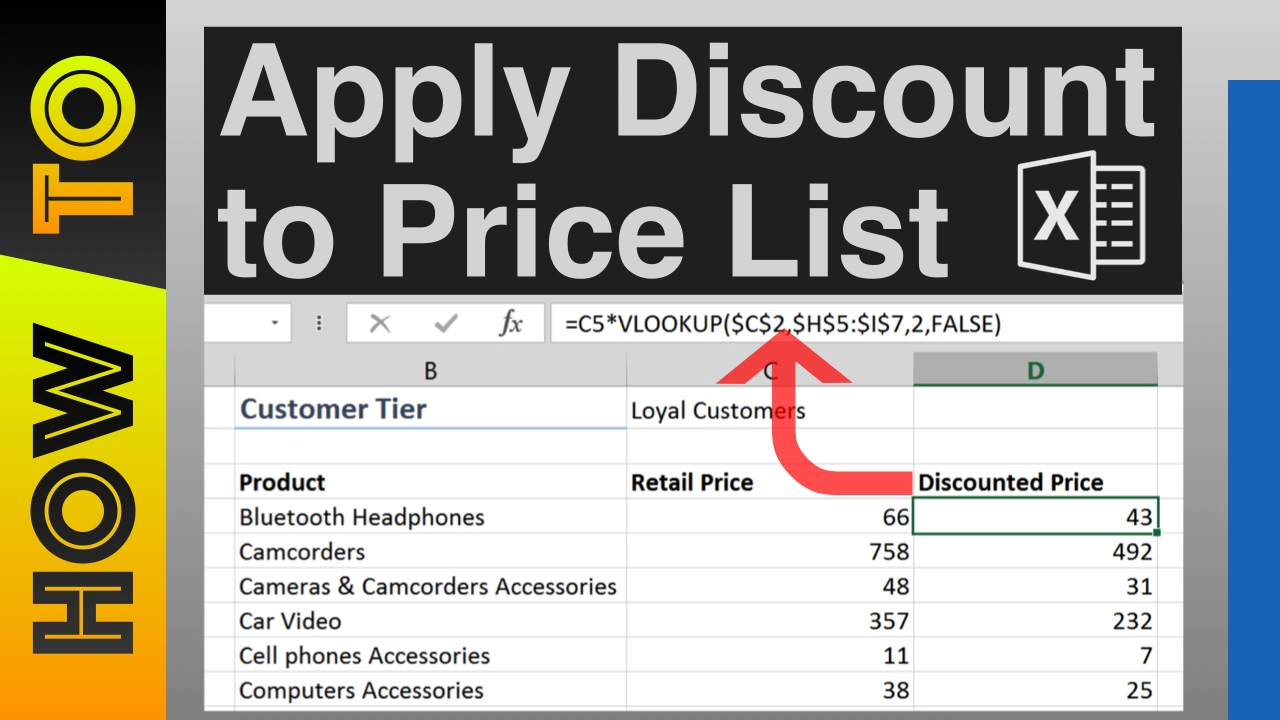
To apply the correct discount rate based on the selected customer tier, we will utilize the VLOOKUP function. This function allows us to retrieve the discount rate from our defined table. Here's how to use it:
1. Select the cell where you want the discounted price to appear.
2. Enter the VLOOKUP formula, referencing the customer tier selection cell as the lookup value.
3. Lock the lookup value cell to prevent it from changing when copied to other cells.
4. Specify the table array, ensuring to lock the range cells as well.
5. Provide the column index number for the discount rate column.
6. Choose the appropriate match type (exact match for text values).
Once you enter the formula, the discounted price will be calculated based on the selected customer tier.
4. Applying Discounted Prices
Now that we have set up the VLOOKUP function, we can apply the discounted prices to the entire price list. By copying the formula to other cells, the correct discount rate will be automatically applied based on the selected customer tier. This ensures that each customer receives the appropriate pricing.
5. Customizing Price Lists for Different Customers
With the foundation in place, we can now customize price lists for different customers. By selecting the customer tier from the drop-down menu, the corresponding discounted prices will be displayed. This allows businesses to cater to the specific needs of each customer segment, enhancing customer satisfaction and loyalty.
6. Modifying Discount Rates
As business requirements change, it may be necessary to modify the discount rates for different customer tiers. By adjusting the rates in the defined table, the prices will be automatically recalculated based on the new rates. This flexibility allows businesses to adapt to market conditions and maintain competitive pricing strategies.
7. Testing and Adjusting Prices
To ensure the accuracy of the price lists, it is essential to thoroughly test and adjust the prices. By selecting different customer tiers and verifying the resulting prices, any discrepancies or errors can be identified and corrected. Regular testing and adjustment help maintain consistency and reliability in pricing.
8. Conclusion
In conclusion, creating different price lists for different customers using the same table is a powerful technique that allows businesses to offer personalized pricing. By leveraging drop-down menus, the VLOOKUP function, and discount rate customization, businesses can efficiently manage pricing strategies for various customer tiers. This approach enhances customer satisfaction, fosters loyalty, and contributes to overall business success.
Highlights
- Efficiently manage different price lists for various customer tiers using the same table.
- Create a drop-down menu to select the customer tier.
- Define discounted rates for each customer tier.
- Utilize the VLOOKUP function to apply the correct discount rate.
- Customize price lists based on customer tiers.
- Modify discount rates to adapt to changing business requirements.
- Thoroughly test and adjust prices to ensure accuracy and reliability.
FAQ
**Q: Can I add more customer tiers and customize their discount rates?**
A: Absolutely! The technique described in this article allows for flexibility in adding more customer tiers and adjusting their discount rates. Simply update the table with the new tiers and rates, and the pricing will be automatically recalculated.
**Q: How can I test the accuracy of the price lists?**
A: To test the accuracy of the price lists, select different customer tiers and verify that the resulting prices match the expected discounts. This testing process ensures that the pricing system is functioning correctly and helps identify any errors or discrepancies.
**Q: Can I use this technique for other types of products or services?**
A: Yes, this technique can be applied to various types of products or services. As long as you have a table with the necessary information, you can customize price lists based on different customer tiers using the same principles outlined in this article.
**Q: Is there a limit to the number of customer tiers I can have?**
A: There is no inherent limit to the number of customer tiers you can have. You can add as many tiers as needed, ensuring that each tier has its corresponding discount rate in the table.
**Q: How often should I review and adjust the discount rates?**
A: It is recommended to review and adjust the discount rates periodically, especially when market conditions or business requirements change. Regularly assessing the competitiveness of your pricing strategy ensures that you remain aligned with customer expectations and industry standards.
Remember, if you have any further questions or need assistance, feel free to reach out to our AI Chatbot at [voc.ai](https://www.voc.ai/product/ai-chatbot). Our chatbot can help automate customer service tasks, reducing your workload and improving efficiency.


