How to Sign Up for HubSpot Account: A Step-by-Step Guide 📝
Are you looking to sign up for a HubSpot account but don't know where to start? Look no further! In this guide, we'll walk you through the process step-by-step, so you can get started with HubSpot in no time.
Table of Contents 📑
- Introduction
- Step 1: Search for HubSpot and Click "Get HubSpot Free"
- Step 2: Fill in Your Details
- Step 3: Choose Your Industry and Role
- Step 4: Fill in Your Company's Information
- Step 5: Prepare Your Account
- Step 6: Take the Tour
- Step 7: Import Your Data
- Step 8: Add Content to Your Account
- Step 9: Complete Your Progress
- Conclusion
Introduction 🌟
HubSpot is a powerful tool that can help you manage your marketing, sales, and customer service all in one place. But before you can start using it, you need to sign up for an account. In this guide, we'll show you how to do just that.
Step 1: Search for HubSpot and Click "Get HubSpot Free" 🔍
The first step to signing up for a HubSpot account is to search for HubSpot in your preferred search engine. Once you've found the HubSpot website, click on the "Get HubSpot Free" button located at the top of the page.
Step 2: Fill in Your Details 📝
After clicking on the "Get HubSpot Free" button, you'll be taken to a page where you'll need to fill in your details. If you already have an account, you can simply log in. If not, you'll need to fill in your details or sign up with your Google account.
Step 3: Choose Your Industry and Role 🏢
Once you've filled in your details, you'll be asked to choose your industry and role. This information will help HubSpot tailor its services to your specific needs.
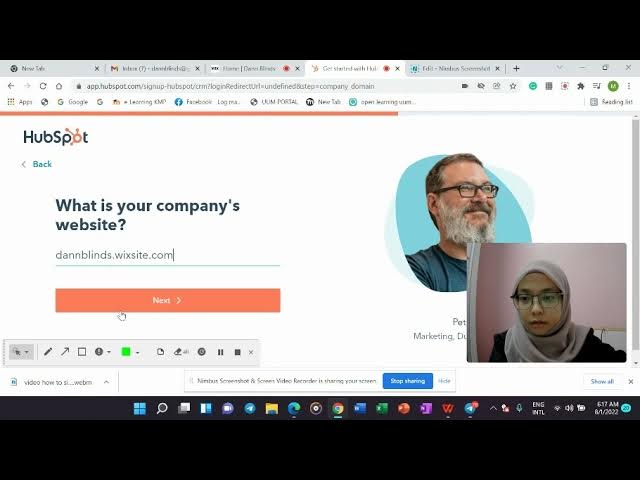
Step 4: Fill in Your Company's Information 🏭
Next, you'll need to fill in your company's information, including its name, the number of people who work there, and its website.
Step 5: Prepare Your Account 🛠️
After filling in your company's information, HubSpot will prepare your account. This may take a few moments, so be patient.
Step 6: Take the Tour 🚶♀️
Once your account is ready, HubSpot will take you on a tour of its features. This will help you get familiar with the platform and its capabilities.
Step 7: Import Your Data 📊
If you have data that you'd like to import into HubSpot, now is the time to do it. HubSpot will provide you with step-by-step instructions on how to do this.
Step 8: Add Content to Your Account 📝
To get the most out of HubSpot, you'll want to add content to your account. HubSpot will provide you with instructions on how to do this.
Step 9: Complete Your Progress 📈
To get the most out of HubSpot, you'll want to complete all of the tasks listed in your progress tracker. This will help you get the most out of the platform.
Conclusion 🎉
Signing up for a HubSpot account is easy and straightforward. By following the steps outlined in this guide, you'll be up and running in no time. So what are you waiting for? Sign up for HubSpot today and start taking your marketing, sales, and customer service to the next level!
Highlights 🔍
- HubSpot is a powerful tool that can help you manage your marketing, sales, and customer service all in one place.
- Signing up for a HubSpot account is easy and straightforward.
- To get the most out of HubSpot, you'll want to complete all of the tasks listed in your progress tracker.
FAQ 🤔
Q: What is HubSpot?
A: HubSpot is a powerful tool that can help you manage your marketing, sales, and customer service all in one place.
Q: Is signing up for a HubSpot account difficult?
A: No, signing up for a HubSpot account is easy and straightforward.
Q: What should I do after signing up for a HubSpot account?
A: To get the most out of HubSpot, you'll want to complete all of the tasks listed in your progress tracker.


