🚀 How to Use Workflows in Slack: A Comprehensive Guide
Slack is a powerful communication tool that has revolutionized the way teams collaborate and work together. With its intuitive interface and robust features, Slack has become the go-to platform for businesses of all sizes. One of the most useful features of Slack is its ability to automate workflows, which can save you time and streamline your work processes. In this article, we'll show you how to use workflows in Slack to boost your productivity and get more done in less time.
📝 Table of Contents
1. Introduction
2. What are Workflows in Slack?
3. How to Access Workflows in Slack
4. How to Create a Workflow in Slack
5. How to Use Workflows in Slack
6. Benefits of Using Workflows in Slack
7. Pros and Cons of Using Workflows in Slack
8. Best Practices for Using Workflows in Slack
9. Conclusion
10. Resources
1. Introduction
Slack is a popular communication tool that allows teams to collaborate and communicate in real-time. With its intuitive interface and powerful features, Slack has become the go-to platform for businesses of all sizes. One of the most useful features of Slack is its ability to automate workflows, which can save you time and streamline your work processes. In this article, we'll show you how to use workflows in Slack to boost your productivity and get more done in less time.
2. What are Workflows in Slack?
Workflows in Slack are automated processes that can help you streamline your work and save time. Workflows can be used to automate repetitive tasks, such as sending reminders, creating tasks, or updating spreadsheets. Workflows can also be used to automate more complex processes, such as onboarding new employees or managing customer support tickets.
3. How to Access Workflows in Slack
To access workflows in Slack, you'll need to have the appropriate permissions. If you're an admin or owner of a Slack workspace, you can access workflows by clicking on the "Apps" button in the left-hand sidebar and selecting "Workflow Builder." If you don't have the appropriate permissions, you'll need to contact your workspace admin to request access.
4. How to Create a Workflow in Slack
Creating a workflow in Slack is easy. To get started, click on the "Apps" button in the left-hand sidebar and select "Workflow Builder." From there, you can choose from a variety of pre-built templates or create your own custom workflow. Once you've selected a template or created your own workflow, you can customize it to fit your specific needs.
5. How to Use Workflows in Slack
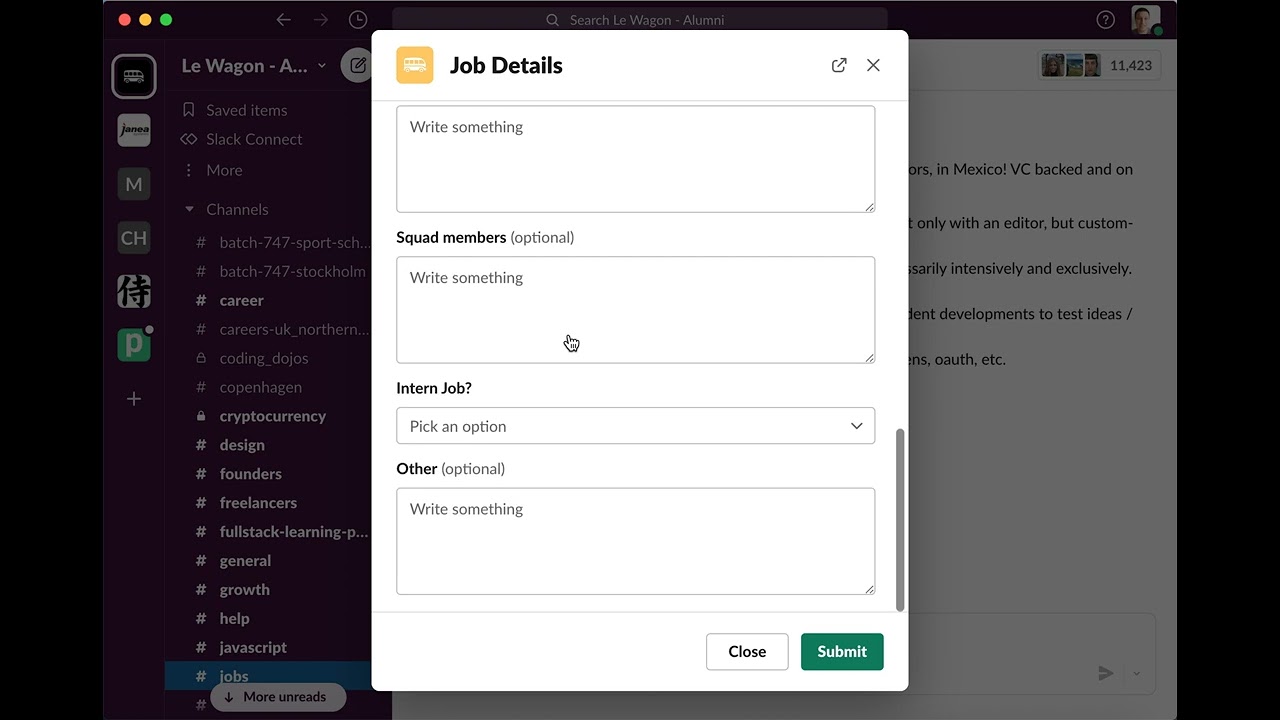
Using workflows in Slack is simple. Once you've created a workflow, you can trigger it by typing a specific command or keyword in a Slack channel. For example, if you've created a workflow to add a new job offer, you can trigger it by typing "/joboffer" in the channel. The workflow will then guide you through the process of adding a new job offer.
6. Benefits of Using Workflows in Slack
There are many benefits to using workflows in Slack. Workflows can help you save time by automating repetitive tasks, such as sending reminders or updating spreadsheets. Workflows can also help you streamline more complex processes, such as onboarding new employees or managing customer support tickets. By using workflows in Slack, you can improve your productivity and get more done in less time.
7. Pros and Cons of Using Workflows in Slack
Like any tool, there are pros and cons to using workflows in Slack. Some of the pros include increased productivity, streamlined processes, and reduced errors. Some of the cons include the potential for over-automation, which can lead to a lack of personalization and human touch. It's important to weigh the pros and cons before deciding whether or not to use workflows in Slack.
8. Best Practices for Using Workflows in Slack
To get the most out of workflows in Slack, it's important to follow best practices. Some best practices include keeping workflows simple and easy to use, testing workflows before deploying them, and regularly reviewing and updating workflows to ensure they're still relevant and effective.
9. Conclusion
Slack workflows are a powerful tool that can help you save time and streamline your work processes. By automating repetitive tasks and complex processes, you can improve your productivity and get more done in less time. Whether you're a small business owner or a large enterprise, workflows in Slack can help you work smarter, not harder.
10. Resources
- [Slack Workflow Builder](https://slack.com/intl/en-gb/help/articles/360041352874-Workflow-Builder-overview)
- [Slack Workflow Templates](https://slack.com/intl/en-gb/help/articles/360041352874-Workflow-Builder-overview#templates)
- [Slack Workflow Best Practices](https://slack.com/intl/en-gb/help/articles/360041352874-Workflow-Builder-overview#best-practices)
🙋♀️ FAQ
Q: What are workflows in Slack?
A: Workflows in Slack are automated processes that can help you streamline your work and save time.
Q: How do I access workflows in Slack?
A: To access workflows in Slack, you'll need to have the appropriate permissions. If you're an admin or owner of a Slack workspace, you can access workflows by clicking on the "Apps" button in the left-hand sidebar and selecting "Workflow Builder."
Q: What are the benefits of using workflows in Slack?
A: The benefits of using workflows in Slack include increased productivity, streamlined processes, and reduced errors.
Q: What are the best practices for using workflows in Slack?
A: Best practices for using workflows in Slack include keeping workflows simple and easy to use, testing workflows before deploying them, and regularly reviewing and updating workflows to ensure they're still relevant and effective.


