How to Connect Your Email Inbox to HubSpot
Are you looking to streamline your communication with potential customers? Look no further than HubSpot's email integration feature. By connecting your email inbox to your HubSpot portal, you can easily log all of your email correspondence with leads, prospects, and customers right into your HubSpot CRM. This allows you to keep all of your communication in one place, alongside other important information like website visits and marketing email clicks. In this article, we'll walk you through the simple steps to connect your personal email to HubSpot and take advantage of this powerful tool.
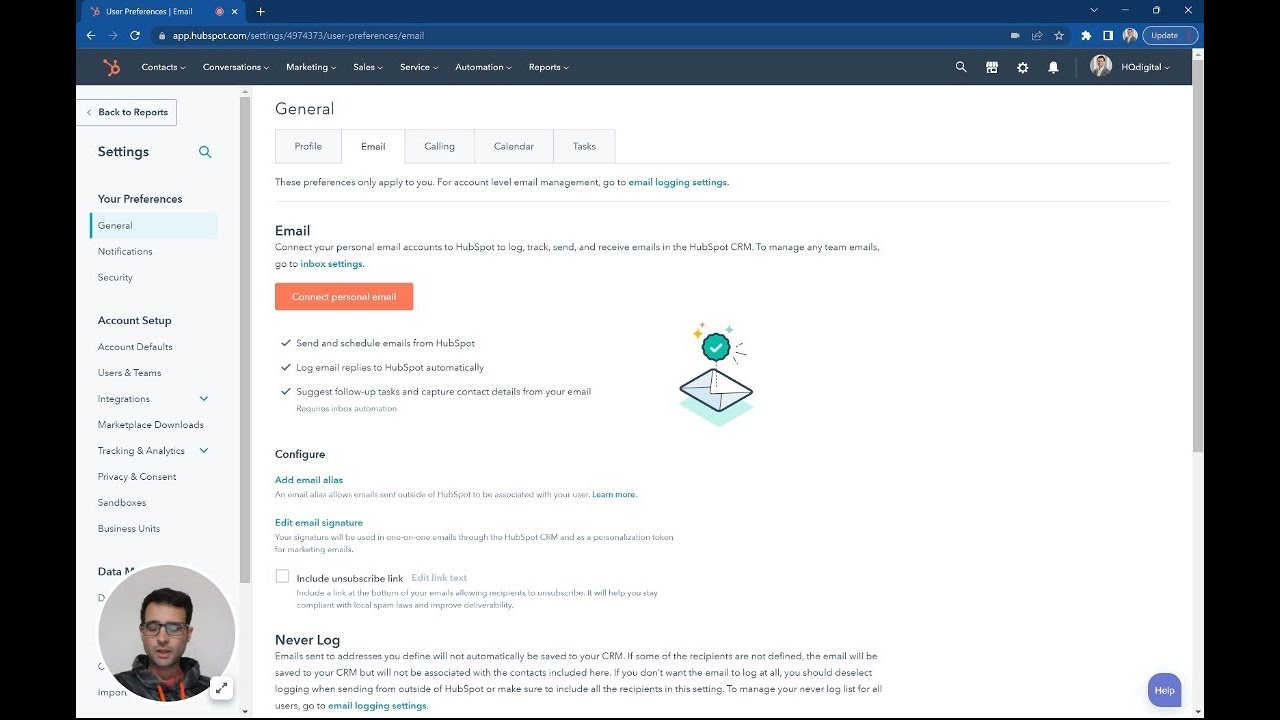
Step 1: Navigate to the Email Tab in HubSpot
To get started, log in to your HubSpot portal and navigate to the "Email" tab. This can be found under the "General" section of the main menu.
Step 2: Connect Your Personal Email
Once you're on the Email tab, click the "Connect Personal Email" button. From here, you can choose to turn on automation if you'd like. Then, simply enter your email address and click "Next."
Step 3: Connect to Gmail
In the next screen, select "Connect to Gmail" and click "Continue." This will open up another tab where you'll need to confirm that you're signing in with your Gmail account. Once you've done that, click "Allow" to complete the connection.
Step 4: Log Emails Automatically
With your email now connected to HubSpot, you can easily log all of your emails to your CRM. When you send an email from your Gmail account, it will automatically be logged to HubSpot. And if you prefer to work in HubSpot, you can even send emails from there and have them appear in your personal email account.
Step 5: Download the Extension
For even more powerful sales tools, consider downloading the HubSpot extension. This will give you access to features like meetings, snippets, and templates, all of which can be controlled right from your Gmail or Outlook account. This means you can stay in your preferred email client without ever having to come back into the CRM.
Connecting your email inbox to HubSpot is a simple but powerful way to streamline your communication with potential customers. By keeping all of your correspondence in one place, you can easily track your interactions and make more informed decisions about how to move forward. So why wait? Connect your email to HubSpot today and start reaping the benefits.
Pros and Cons
Pros
- Streamlines communication with potential customers
- Logs all email correspondence to HubSpot CRM
- Keeps all communication in one place
- Allows for easy tracking of interactions
Cons
- Requires a HubSpot account
- May take some time to set up initially
Highlights
- Connecting your email inbox to HubSpot is a simple but powerful way to streamline your communication with potential customers.
- By keeping all of your correspondence in one place, you can easily track your interactions and make more informed decisions about how to move forward.
- With the HubSpot extension, you can access powerful sales tools like meetings, snippets, and templates, all of which can be controlled right from your Gmail or Outlook account.
FAQ
Q: Do I need a HubSpot account to connect my email inbox?
A: Yes, you'll need a HubSpot account to take advantage of this feature.
Q: Can I log emails automatically from HubSpot?
A: Yes, when you send an email from HubSpot, it will automatically be logged to your personal email account.
Q: Can I control sales tools from my email client?
A: Yes, with the HubSpot extension, you can access powerful sales tools like meetings, snippets, and templates, all of which can be controlled right from your Gmail or Outlook account.
Resources:
- [HubSpot](https://www.hubspot.com/)
- [HubSpot Extension](https://www.hubspot.com/products/sales/gmail-extension)
Don't forget to check out our AI chatbot product at [voc.ai](https://www.voc.ai/product/ai-chatbot) to see how it can help reduce your workload on customer service.


